Follow overview
Understand what Follow needs, what it shows, and how to keep control when live tracking is uncertain.
What Follow does
Follow tracks a live performance against the open score and can turn pages while you keep playing. You remain in control: manual page turns and the on-score anchor stay available during a session.
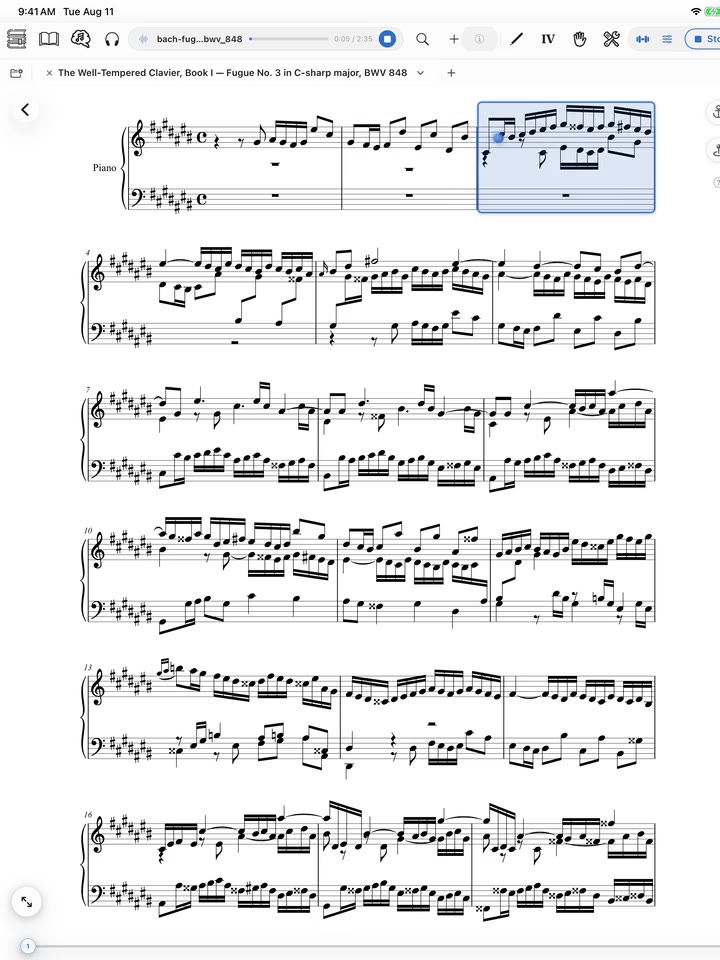
A live tracking view. Lab is diagnostic; the score and manual controls remain available.
What Follow needs
- A score that has been prepared in
Trainer. - Microphone permission and a usable input signal.
- A network connection to the live alignment service.
- A Smart Score or a calibrated PDF layout that gives the tracker a reliable score map.
Start with Prepare a piece for Follow. A greyed Follow control opens Trainer because one or more preparation steps are still missing.
What you see
Open the Follow preset to choose Follow me live and an on-screen mode:
No tracker: page turns without a tracking overlay.Blue band: marks the current system.Band + note dot: adds note-level position where the score supports it.System pointer: one coarse rectangle marks the current line. It toggles on top of the band rather than replacing it.
While a tracker is on, the RECTANGLE picker sets how wide the band is: By measure frames the whole bar; By beat sweeps one beat at a time.
With Band + note dot, the DOTS picker chooses which notes carry a dot. Auto-detect follows the note the tracker lands on. Soprano, Alto, Tenor, and Bass combine freely — one dot per selected voice, each in its own colour. Right hand and Left hand instead pin a single dot to the upper or lower staff.
The preset also exposes page-turn timing and confidence controls. Test those settings on the device and score you will use; they affect when the app holds or advances.
The main transport reads Follow for live microphone input and can read Play when Replay a take is selected. Play replays a saved recording; it does not start a live microphone session.
During live use, Page Turner sends short microphone-audio segments to its service so the performance can be aligned in real time. This processing is separate from optional storage for model training. Share follow audio for model training is off by default. See Data and audio.
Beta Follow can lose position when the input is quiet, noisy, very different from the prepared reference, or structurally ambiguous. It should not be the only page-turn method for a critical performance. Keep a manual control or Bluetooth page pedal ready.
Next: Run a live Follow session or improve reliability.
Did this page answer your question?
One tap. No message or account required.
Last reviewed 2026-07-18 · Beta · build 314